|
Click to recommend this page:
| |
In April, I wrote an article titled, "keywording's role in the future of stock photography". The premise being that, once the dust settles around the large influx of new players in the stock photo industry, they will eventually have to compete with one another based on the quality of photo search results, not image quality. (There's plenty of "quality" to go around, despite the grumblings of long-time pros who may feel otherwise.) In my article, I outlined the scope of the problem, proposed a technical solution, and presented a business case for it.
To summarize it, search results are only as good as the data available to search on. People can add keywords to an image, but the search mechanism has to determine whether a search term or phrase is satisfied by those keywords. The problem with current keywording standards is that there is no syntax available to describe the semantics of a word. It's not just its actual meaning--a "turkey" is both a type of bird, and the name of a country--but it's also the words that modify its meaning. For example, if it were a young turkey, then "young" would be added to the list. The way keywords are defined today, all have the same weighting, thereby having no semantic effect on one another. If the photo also had an old woman with a hatchet about to chop off the turkey's head, then there would also be the keywords "old" and "woman." However, this presents the problem that the image is a valid match for the search phrase "young woman." This is what is called a false positive.
I proposed a keyword-binding character, such as the colon (:) or pipe/vertical-bar (¦) character to associate one keyword with another. Hence, "woman:old" (or "woman¦old") would be a single, semantically cognizant keyword, rather than as two unrelated keywords.
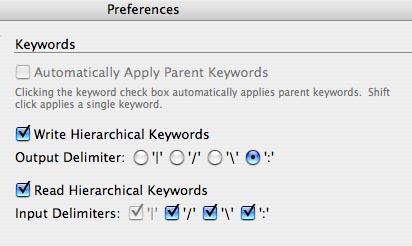 My article went on to say that for this to work, an independent company would have to support the idea by implementing it in their image management products. I'm excited to say that Adobe has just re-released their Bridge product, which is their image-management component of their "Creative Suite 3" product line, to support precisely what I had proposed. Existing users of Photoshop or other CS3 applications can use the Software Updates option to download the new version. To get hierarchical keywords, you only need to turn on the user-preferences switch. (The image shows my particular preferences.) That is, by default, selecting "Turkey" would have that word by itself assigned, but if preference for hierarchical keywording is set as the graphic shows, the single keyword "Country:Turkey" would be assigned. My article went on to say that for this to work, an independent company would have to support the idea by implementing it in their image management products. I'm excited to say that Adobe has just re-released their Bridge product, which is their image-management component of their "Creative Suite 3" product line, to support precisely what I had proposed. Existing users of Photoshop or other CS3 applications can use the Software Updates option to download the new version. To get hierarchical keywords, you only need to turn on the user-preferences switch. (The image shows my particular preferences.) That is, by default, selecting "Turkey" would have that word by itself assigned, but if preference for hierarchical keywording is set as the graphic shows, the single keyword "Country:Turkey" would be assigned.
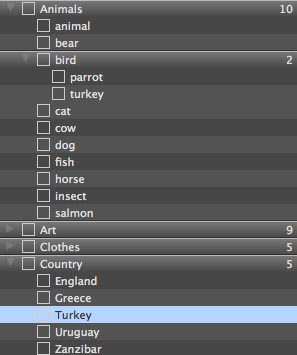 An example hierarchical structure may look like the second graphic shown here. An example hierarchical structure may look like the second graphic shown here.
So, now that it's out there, what can be done with it? What can we expect in the future and when?
For the moment, nothing. For this (or any other idea) to work, it requires both photographers and searching agents to adopt the syntax, and this may take some time. Setting up keyword hierarchies is easy with Bridge because most people have already defined image "sets" with older versions of the program, and certainly with the new multi-level hierarchies that were introduced with Bridge 2.0. The only thing necessary now is simply to turn on the switch and "rebuild" your image caches with the preference set.
The searching agents, which range from photo-sharing sites like Flickr and smugmug, to microstock and macro-stock agencies, only need to do one little thing: look for the keyword-binding character in keyword lists. Implementation can come in two stages: first, just be aware that it's there, and use it as a keyword-separating exactly as though it were a comma or semi-colon, which are already used to separate keywords into the existing "flat list" syntax in use today. The net effect here is that you're ignoring the photographer's hierarchy, but not losing any of the keywords. So, "Country:Turkey" just looks the same as if it said "Country, Turkey", which is a syntax you already look for anyway.
Later, you can build the hierarchies when you're ready to have more sophisticated search behaviors, such as prompting the user with the option: "For 'turkey', did you mean Country or Bird?"
I'd like to hear from anyone, photographer or agency, that has it in their plans to use this new syntax. Of course, I always invite email comments to my posts. I don't permit comments on my blog because it's far too time-consuming to monitor it.
Click to recommend this page:
|
|

