|
Click to recommend this page:
| |
 Introduction
Many people think of the flash on their camera as a main light source
for when the scene is too dark to take a picture: a night photo, inside
a restaurant, at a party, etc. They almost never use the camera's flash
for any other purpose. The problem is, a full strength flash tends to blow
out the foreground with a big burst of light. This helps you see the smiling
subjects well, provided that they are close enough, but the background is
left completely dark. How close do the people have to be? A flash's light
is typically effective between 5-10 feet (1½-3 meters). While a
stronger flash may illuminate stuff further back, it'll only overexpose
the foreground even more. In other words, a flash distorts the normal
light balance in the picture, which isn't what your eye sees, yielding
an unsatisifying "snapshot" where the background is all black.
Many consumers are happy with this, but more serious photographers
generally are not. It isn't really possible to get a "good" picture in
the dark using solely a flash on your camera because of this. Instead,
you have to use additional lights or other methods discussed in other
articles. You should understand the issues behind this in the section,
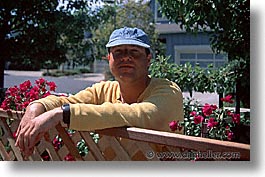
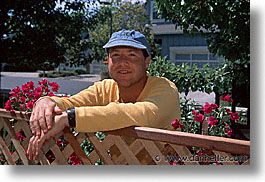
Techniques on Metering Light with your Camera. However, you can use your camera's flash to strongly
improve other kinds of pictures where people traditionally don't think
of using a flash, such as a mid-day sun, and other brightly lit scenes.
 Purpose of Fill Flash
Because camera manufacturers calibrate the flash to be used in the way
people expect (as the main light source), the flash has become one of
the most misused components of the camera. As mentioned, people often
use their flash when they don't think there's enough light in a scene to
take a normal picture, resulting in "bursty" snapshots. On the other
hand, when the main light comes from another source, like the sun,
or other naturally-lit situations, people don't use their flashes,
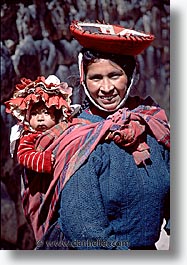
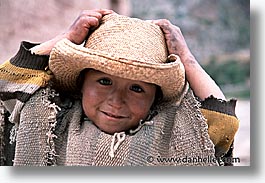
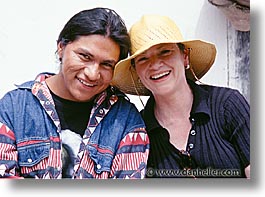
leaving dark shadows under the eyes, or an entirely black area under
a hat because the contrast between dark and light is too much for film
(or digital cameras) to capture.
Shooting with a flash in the daytime using the flash in its default setting
will burst light thinking it's the main light source (because that's how
the camera was configured because that's how most people use a flash), causing
an equally bad, albeit different picture. That is, the flash will
burst the same amount of light as the main source, leaving a complete flat,
bland and pretty ugly photo. Worse, it'll also likely be out of balance
with the background or other elements that the flash may not reach
(as noted above).
So, if using a flash makes for too a flat image, and no flash
makes for too much contrast and shadows, what do you do?
The secret is to find that middle ground by setting the flash so that
it only bursts enough light to illuminate the shadows, but maintain
the balance that your eye normally sees. This is called "fill flash"
because it fills in the details that would otherwise be lost because of
the high dark and bright contrasts in the scene. The general guidelines
suggest to reduce flash output anywhere from 2/3 to 1-1/3 stops,
depending on creative control and the degree of which there is a lighting
imbalance in the scene.
For regular point-n-shoot cameras, your flash is almost always set by
a button that looks like a lightning bolt. Usually, you press that
button multiple times while the LCD display on the camera cycles through
a variety of icons that show which flash mode you're in. I'm not going
to discuss each mode, so read your manual to determine which is the
"fill flash" mode. When you discover which is correct, you generally have
the result I discussed above. Failing that, you can consider taping paper
(tissue or otherwise) over the flash or using a colored gel (discussed below).
For those using SLR cameras, most have popup flashes on the camera body
itself. You can reduce the output in these as well, but not using the
simplified "icon" method above. Again, read your manual, but it's generally
the case that you press the button that pops-up the flash a second time
to put the camera into a mode where you can set the flash output using
one of the rolling control dials. You can often reduce the output in half
or third-stop increments. (If you can't reduce flash by 2/3 of a stop,
round up to a full stop.)
If you have an older camera that has no such dials, or you are using an
external flash unit that you attach to the top of the camera, you need to
set the output power on the flash unit itself. Here are some general
methods to use or think about when deciding how you want to reduce flash
output power.
 Adjust your flash exposure, not your camera's exposure!
Adjusting flash exposure is not to be confused with adjusting the
camera's exposure. Exposure time is constant for any given lighting
situation, set by the amount of light present in the scene. The fill flash
is not going to change the exposure at all—it's just there to fill in
shadows that would otherwise not show up because they're too dark.
Some cameras may adjust the exposure of the photo if it thinks that the
flash output has also been altered, but for these cameras, the system is
programmed to do essentially what you're after anyway. (It's just another
way around the mountain.) Like any other photo technique, it takes time
and experience to fine tune before you're an expert.
Place a warming filter (gel) over the flash.
Placing a gel over a flash not only reduces the flash output (generally
by anywhere from 1/8 to 1/2 of a stop), but it may also add some "warmth"
to the scene (if you use the right kind of gel).
The easiest way to do this is to obtain a demo pack of Rosco gels. They are
usually free, and available in most pro camera stores, especially those that
sell studio lighting equipment. They are little strips of samples that
demonstrate the full line of filter gels that Rosco makes. It just so happens
that these sample strips fit perfectly over a flash head for most 35mm cameras.
Whether you obtain Rosco gels or something similar, place the lightest
warming filter over the flash head. This may reduce the flash power by
an 1/8 of a stop, but this is good, so don't worry about it.
If you can't find a filter, use a diffuser (like tissue paper or just
regular white paper) over the flash.
Experiment with a flash cable chord.
This step is hardly "required" (I do it sparingly), but if
you want to optimize your effect, it's certainly worth trying.
(Some wedding photographers do this religiously.)
A flash chord is used to attach the flash to the camera on the same
hot shoe, but lets you move the flash away from the camera body itself.
Here, you have to hold the flash with your left hand (or have an assistant
hold it) while you shoot with your right hand holding the camera. All
this is to keep the light from blasting directly onto the subject from
the behind the lens. This effect helps remove harsh shadows. For
best effect, bounce the flash off nearby walls, ceilings or other
nearby objects (that are bright but not reflective, like a mirror).
Side Effects
You're NOT going to get studio quality lighting like you see in magazines.
Photographing in dark rooms, or under conditions where the main light source
is my flash, always results in photos that I don't like. (You may not mind.)
I try to shoot near brighter natural light if possible, but that's hardly
ever your option. So, how do I shoot in darker conditions? I either suffer,
or use additional lighting methods.
Two of the side effects of using any flash on a camera are: reflections
and shadows. This is all the more reason to use a reduced power in the
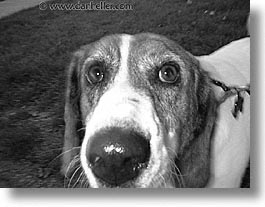
flash. At full power, a subject appears "bursty" with light reflecting
too strongly off the eyes and other shiny objects (like a wet nose). The
stronger the flash, the stronger this effect, but worse, the more likely
back-shadows will occur and out of balance the foreground (subject) will
be with the ambient background scene.
A weaker, subtler fill flash will reduce this effect considerably.
The other side effect of an overly strong flash is the back-shadow.
Note, this may not always be avoided, since certain lighting
conditions require some sort of light, and if all you have is a flash,
then that's the best you can expect. Still, using a fill flash will
reduce the intensity of this effect (although it may never entirely go
away). If you have a separate flash from the camera (even if you mount
it on the camera), you can angle the "head" to point in another direction,
like up (to bounce off the ceiling) or sideways (to bounce off the wall).
Bounced light is also diffused considerably and reduces the back-shadow effect.
Click to recommend this page:
|
|